Workspace
Composes — Case · Task · Queue · Session (over the Record)
The Workspace is the application a reviewer signs into. At its center is the Reader — where a reviewer opens a case’s file, reads the evidence, and decides its issues. Everything else in the Workspace is the loop around that center: the worklist that hands the reviewer the next case, the authoring that composes the decision from the issues they decided, the calendar that plans the hearings a case needs, and the configuration that shapes how the whole operation runs. There are not separate apps for “the documents,” “the work,” “the calendar,” and “the configuration” — they are stations on one loop over one record, gated by the role the person holds.
What loads on sign-in
A reviewer signs in to a worklist — a dense, sortable table of the cases waiting on them, not a wall of summary cards. Each row is a case: its identifier, type, the task that’s waiting, who it’s assigned to, how long it’s been waiting, and when it’s due. The table is sortable on every column and opens on a sensible default order, so the next case to work surfaces at the top. Sort and filter are a view a reviewer configures — by deadline, age, stage, or assignee — and the worklist can reapply that view each time it opens.
What the worklist reads changes by role. A reviewer’s worklist is the cases assigned to them and the tasks waiting on action. A team supervisor’s is the team’s queues — depth per member, the cases past their workflow deadline, and the escalations the sweeper applied since they last signed in. An operator’s is the operation itself — the configuration changes recorded in the last day, the distribution runs that completed or errored, and the integration adapters reporting healthy or failing. One table idiom, one Record underneath; what differs per role is which records the table reads.
The worklist paints before its data arrives: the shell — the columns, the sidebar, the search — renders first, then the rows fill in, so sign-in lands on a usable surface rather than a spinner. From any row, the reviewer opens the case — and the case opens in the Reader.
The loop around the Reader
A case’s life is a reviewer’s day, and the Workspace’s surfaces are the stations that day passes through. They are not co-equal views of equal weight; they are the loop, hinged at the center where evidence becomes judgment:
| Station | What it is | What happens there |
|---|---|---|
| Worklist | A saved, ordered, filterable table of the reviewer’s cases and tasks | Pick the next case to work |
| The case | One case opened — the Reader at the center, every engine composed around it | Read the evidence, decide the issues, author and sign the outcome |
| Calendar | The forward schedule of placed sessions | Plan and run the hearings a case needs |
| Configuration | Admin, gated by role | Shape the case types, workflows, rules, and roles the loop runs on |
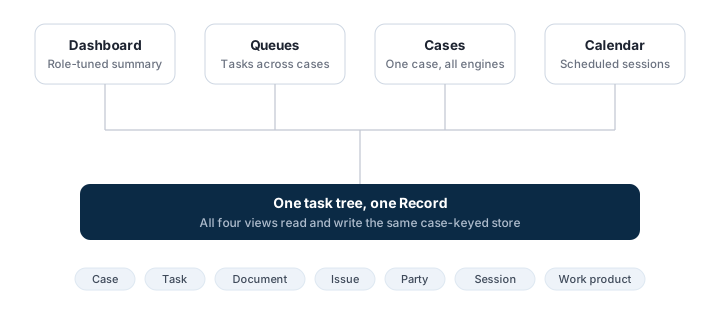
Moving between stations is navigation inside one application, not a switch between apps. They share the sidebar, the search, the keyboard shortcuts, the sign-in, and the live task tree underneath — so a task completed inside the open case drops out of the worklist in the same moment, on the same screen. The loop is the rhythm: a case is taken in, surfaces on a worklist, opens in the Reader to be read and decided, its decision is composed and signed, the outcome is quality-reviewed and dispatched, hearings (when a case needs them) are scheduled and held with their transcript landing back as evidence, and follow-on work re-enters the worklist. The Docket is the engine that drives that flow; the Workspace is where a person works it.
The case — the Reader at the center
Opening a case is where the engines compose, and the document surface is the one they orbit. The case opens with its identifiers and state in the header, and the engines arranged as panes around the center:
- Documents — the Reader. This is the center: the document-review workstation, where the case’s file is opened, read, searched, annotated, and tagged, and where each issue is linked to the evidence pages that prove it. It isn’t reached from a separate application or a separate sign-in — it is the case, and the other panes read what it produces.
- Issues — the case’s unified issue list, each with its scope, type, disposition, and the documents that are its evidence. This list is the seam: the reviewed, annotated evidence in the Reader becomes the decided issues here, and the issue list is what the decision is organized around. Editing an issue’s disposition updates what the decision package will carry.
- Tasks — the case’s task tree, with assignees, statuses, and the deadlines and escalations the engine tracks. Reassignment and bulk actions happen on this pane.
- AI — the case’s AI layer: ask the record and land on the cited page, and review the grounded claims it surfaces — suggested issues, relevant pages, and tasks, each carrying its evidence, model, and confidence, accepted, edited, or rejected in place. The AI suggests on the page; the reviewer decides.
- Authoring — the work product in progress, composed from the decided issue list and the evidence behind it, signed in this surface. The decision uses the issue list as its outline; every disposition cites the page its evidence is on.
- Parties — the participants on the case, their roles, and their representation.
- Sessions — the hearings scheduled or held on the case, the worksheet from each, and the transcript and recording each produced — which return to the Reader as evidence.
- Decision package — the outcome shaped for dispatch out, with the dispositions per issue and the recipients on the case.
- Events — the case’s full audit trail, newest first.
The panes read and write the same record. Annotating a document in the Documents pane appears as an Event in the Events pane in the same moment; deciding an AI suggestion in the AI pane writes the Issue that shows up in the Issues pane; signing a work product fixes the dispositions the Decision package pane composes. There is no copy of the case anywhere — just one record, read from several angles at once, with the Reader at the middle of them.
Several reviewers, one case
A case is rarely worked alone. Several reviewers open the same case at once, each seeing the others’ annotations, issue edits, and task assignments as they land. A reviewer @-mentions a colleague on a document or an issue, and that person is notified with a link straight to it. Read state is per reviewer — each person keeps their own place in the file while everyone shares one record. The case surface is a working surface, not a single-user form.
Calendar
The calendar reads the same Sessions the case surface does, from the planning angle: the forward schedule of placed sessions, the day’s docket, and a participant’s own assigned sessions. From any session a user opens the case it sits on and the case’s evidence next to it. Booking a session here lands as a task on the same tree the worklist and the case surface show — and the transcript a held session produces returns to the case as evidence the Reader opens.
Configuration
The configuration station — Admin — is part of the Workspace, gated by role. An operator who can configure case types and rules sees the Admin area in the same sidebar a reviewer uses; a reviewer’s sidebar does not show it. Sign-in, navigation, search, and the audit trail are shared; capability gates control what each role reaches. Case types, workflows, rules, and roles are configuration, not per-customer forks — a deployment shapes the loop here without changing the core. The shell is the same one application for everyone, configured per role.
External participants
A representative, a power of attorney, or an appellant signs into the same surfaces, scoped by role — the cases their role on the case authorizes, with the panes their role authorizes. There is no separate portal that resyncs from the operation’s database; an external participant reads the one record directly, narrowed by the role they hold, on the same worklist-and-case idiom an internal reviewer uses. The isolation and capability gates are the same ones that hold inside the operation.
One product, one record
The Workspace is one application built around one center. A reviewer signs in to a worklist; the case opens in the Reader, where evidence becomes judgment; the surrounding panes and stations are the loop that feeds the Reader its next case and consumes what it produces; the operator’s area is the same shell, gated by role; external participants read the same record on the same surfaces, narrowed by role. The pieces compose because they share one substrate and one record — and that’s what lets the platform stay one commercial product rather than a set of apps wired together.