Reader
The Reader is the capability Adjudicate is built around and ships today: the surface where the evidence in a request’s file is opened, navigated, searched, annotated, and cited. It is the document-review stage of the lifecycle, and the built core every other capability reads from or writes to — this is the page that documents what the product does now.
Its data model has four nouns: appeal, document, annotation, and tag. Documents additionally carry a category (medical, procedural, other, index). Everything else — searches, exhibits, summaries, exports — is derived from these.
The matter being adjudicated is its own concept — the issue. Tags, categories, and annotations mark documents; documents are the evidence relevant to issues. See Issues below.
The four nouns
Appeal
An appeal is a request directed to the adjudicating body. In Adjudicate it carries the docket number, the Veteran’s name, the date the file was ingested, and the size of the source PDF.
{
  "kind": "appeal",
  "id": "demo-3247821",
  "docketNumber": "240118-3247821",
  "veteran": {
    "firstName": "Marcus",
    "middleName": "T",
    "lastName": "Rivera"
  },
  "uploadedAt": "2024-12-04T19:22:11Z",
  "originalPdfBytes": 87422155
}
An appeal is the isolation boundary — every document, annotation, search index, and audit event is scoped to exactly one appeal, and the access layer enforces that scoping at the architectural level rather than as a policy overlay. See Data.
Document
A document is a structured slice of the source file. Most case files arrive as a single large PDF with no boundaries marked; document extraction at intake produces the slices the Reader navigates.
{
  "kind": "document",
  "id": "doc-9c2b41",
  "appealId": "demo-3247821",
  "name": "VA Form 21-526EZ — Application for Disability Compensation",
  "type": "VA Form 21-526EZ",
  "startPage": 1,
  "endPage": 7,
  "position": 0,
  "receiptDate": "2023-08-14",
  "description": "Initial claim for service connection — tinnitus, lumbar strain"
}
Two fields warrant note:
receiptDateis the date the document was recorded as received, not the date it was authored. Adjudication runs on receipt-date ordering — the regulatory clock starts when the document was received, not when it was signed.positionis the document’s order within the appeal as the reviewer arranges it (folder view, drag-to-reorder). This is distinct fromstartPage(PDF page within the source) — once the file is broken into documents, reviewers reorder them by relevance, not by where they happened to appear in the upstream PDF.
Annotation
An annotation is anything a reviewer puts on the file — a highlight, a margin note, a flag, a cross-reference. Annotations are anchored to a specific page within a specific document and carry a comment.
{
  "kind": "annotation",
  "id": "ann-72a019",
  "appealId": "demo-3247821",
  "documentId": "doc-9c2b41",
  "page": 3,
  "x": 0.412,
  "y": 0.187,
  "comment": "Tinnitus reported in 2018 STRs — supports nexus",
  "relevantDate": "2018-04-12"
}
x and y are normalized 0–1 coordinates so the annotation’s position survives PDF page-size variations (letter-size vs scanned legal-size, etc.). relevantDate is the legally relevant date the annotation points to — typically a treatment date, exam date, or service event — and is searchable independently of when the annotation itself was authored.
Tag
A tag is a structured marker attached to a document, used to group documents by issue, exhibit, or argument.
{
  "kind": "tag",
  "documentId": "doc-9c2b41",
  "label": "Issue: Tinnitus"
}
Tags are appeal-scoped (you tag documents within an appeal; tags from one appeal don’t leak to another) and free-text but typically follow team conventions: Issue:, Exhibit:, POA:, Translation needed, etc. They surface as filter chips in the folder view.
Tags mark documents; they don’t capture what the file is about. That’s a separate, first-class concept — the issue — and it’s next.
Issues: the adjudicated matter
An issue is the unit of adjudication: a specific matter being decided — service connection for tinnitus, an increased rating for lumbar strain, an earlier effective date. Each issue carries a scope (the matter being claimed) and a disposition that’s updated as the appeal progresses — granted, denied, remanded, dismissed, withdrawn, vacated (the set is configurable per deployment). Each also has a type, which is what makes outcome reporting by issue possible.
An issue is what the file is about — the matter being decided. Documents are the evidence for issues, linked many-to-many: one exam can support several issues, and one issue can draw on documents from across the file. Link a document to an issue and the Reader opens straight to that evidence.
Together, an appeal’s issues are its unified issue list — the spine of the decision. The AI layer extracts and consolidates that list from the documents and proposes the evidence behind each one; the reviewer curates it. Outcomes then roll up by issue type for reporting.
Sidecars
Two derived artifacts ride alongside the documents:
- Search sidecar — a per-page text extraction (gzipped JSONL) that powers full-text and semantic search. For born-digital documents the extraction is direct from the PDF text layer; for scanned documents it comes from OCR routing. See Ingestion.
- Categorization — at intake, documents are classified into
medical,procedural,other, orindex. The categorization survives reordering and serves as a coarse filter (“show me only medical docs”).
Both are derived, both are regenerable, neither is the source of truth. The source of truth is the document records + the original PDF.
What this enables
The same four nouns power:
- Folder view — documents listed in reviewer-chosen order, with type, receipt date, and tag chips.
- Reader view — open one document, render its pages, see annotations from any reviewer working the appeal.
- Universal search — query the search sidecar across every document in the appeal, jump to the page+coordinate of any hit.
- Cross-references — annotation links carry the document ID + page; a citation in a decision draft can resolve back to the exact evidence.
- Audit log — every event (view, annotate, search, tag, download) carries the appeal ID + document ID + actor + timestamp.
The same model is the substrate for the platform’s privacy boundaries — every record is keyed by appeal ID, and the access layer refuses cross-appeal queries. See Data & isolation.
Search
Open an appeal, type, and every page that matches surfaces at once — across hundreds of documents and tens of thousands of pages. Results come back grouped by document, each one a click from the page it sits on, with the match highlighted in context. Search is fast, exact, and scoped to the one file the reviewer is in.
Architecture
Search runs against a per-appeal sidecar — a compact per-page text index built from the file once, then read directly by the browser on every query. The PDF is never re-parsed at search time, and no search server sits in the request path: the index is built once, served as an object, and matched client-side.
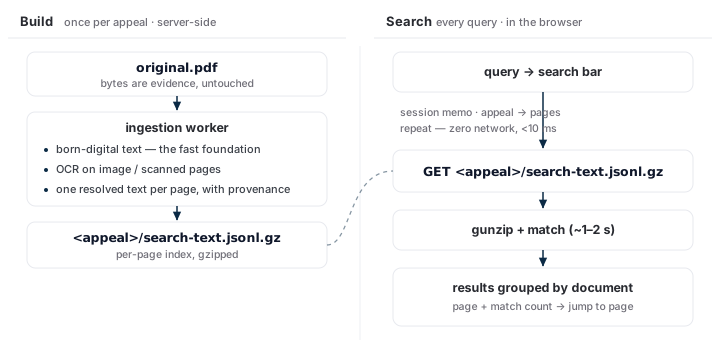
The sidecar is per-appeal and per-page: a header line followed by one {"p":<page>, "t":"<text>"} line per page, gzipped. It’s keyed to the PDF’s content hash, so a changed file rebuilds the index automatically.
One index, two consumers. The same sidecar powers both appeal-wide search across every document and in-document find (Cmd-F) inside the open one. The rendered page and the search index read the same resolved text, so every hit lands on text the reader can see.
Fast
Search is fast because the expensive work happens once, off the query path:
- Born-digital text is the foundation. Most pages carry a real text layer; the PDF engine reads it directly, no image processing. The worker range-fetches only the bytes it needs, so a born-digital file indexes in about a second and a large mixed file in seconds.
- Built before the reviewer arrives. The index is generated when a file is ingested, so a new appeal is search-ready before anyone opens it.
- Queries run in the browser. A search is an object fetch, a decompress, and a match — about 1–2 seconds on a multi-thousand-page file. Repeat it in the same session and it returns in under 10 milliseconds, with no network at all.
- The index is one appeal. It stays small no matter how large the deployment grows, so search speed doesn’t degrade as the corpus does.
The one-time build scales with the file: about a second for a few hundred pages, tens of seconds for a 20,000-page scanned record. Every search after that is sub-second to a couple of seconds.
Relevant
A result is navigation, not a flat list:
- Grouped by document, with page and match count, so a search for a treatment date shows which records mention it and how often.
- Jumps to the exact page, match highlighted in context — the same page anchor an annotation uses. Search gets you to the evidence, not just to the fact that it exists.
- Composes with filters. A result is a set of documents, so it intersects with the folder view’s category, tag, and date filters — “claim forms mentioning tinnitus, received after 2022.”
Search ranks by relevance and matches meaning, not only exact words. A vector index over the same per-page text surfaces the pages about a query — the evidence relevant to an issue — even when they don’t contain the typed terms. Because it reads the text already in the sidecar, semantic relevance is another read over the same index, not a separate store to keep in sync.
Plug-and-play providers
The sidecar is a contract: one resolved text per page, with provenance. How that text is produced is a set of pluggable providers behind the contract — the same integrate-or-provide seam the platform uses everywhere (see Integrating Adjudicate). A deployment composes the providers it needs; the Reader, the search path, and the sidecar format don’t change.
| Provider | Role | Engines |
|---|---|---|
| Born-digital extraction | Pull the existing text layer from the PDF — fast, exact, the default for every page that has one | The Reader’s PDF engine |
| OCR | Recover text on image-bearing and scanned pages where the embedded text is missing or garbled | PaddleOCR (PP-OCRv5), Surya, docTR, Tesseract |
| Vector / embeddings | Turn page text into vectors for semantic relevance over the same index | A self-hosted embedding model |
How they combine per page:
- Born-digital is tried first and kept wherever it’s good — it’s the fast foundation, and the page image is always the original bytes regardless.
- OCR is a supplement, not a replacement. On a page whose embedded text is poor, the configured OCR engine re-reads the image; the build resolves one authoritative text per page and records why — which engine, which model, confidence, and the retained original. Nothing is overwritten, so you can reconstruct what a reviewer saw on the day they relied on it.
- Engines are swappable and self-hosted. A deployment with strict data-handling rules runs OCR in its own environment; one tuning for accuracy on a specific document population picks the engine that scores best on it — or runs two and votes. Choosing Surya over PaddleOCR is configuration, not a code change.
That’s the commercial shape: a finished, fast search surface on top, and a text-production stack underneath that’s configurable to the customer’s corpus, accuracy bar, and data-residency rules — bring your own OCR and embedding engines, or use the platform’s, without forking the product.
Appeal-scoped
Every sidecar is one appeal’s text, and a query runs against exactly that index — search is scoped to one appeal. The per-appeal isolation boundary runs through the search path: a query returns only hits from the file the reviewer is in. Finding evidence across cases means opening each appeal — an occasional extra click, and a guarantee that one record stays sealed from another’s view.
Export — feeding the decision
The Reader is also where evidence flows out. Citations (each carrying the document ID + page), annotations, and issues export through the API and SDK — the structured, traceable inputs a document-authoring tool composes a decision from (an integrate-or-provide capability — see Integrating Adjudicate). Every citation resolves back to the exact page it came from.