Workflow
The workflow engine is the spine — the layer that connects every other capability, built on the data model and the isolation boundaries. It’s configurable: a deployment defines its own task types, queues, and routing rules as data, so the same product runs each operation’s process without a code change.
A case is a body of work that moves through stages, gets assigned and reassigned, waits on other work, and occasionally branches. The engine models that work as data and drives it forward.
Tasks: the unit of work
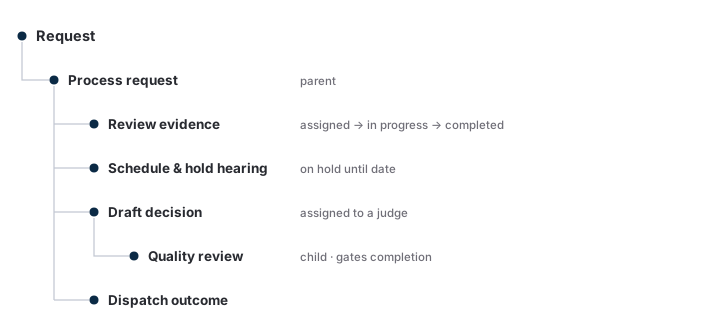
Every actionable thing on a case is a task — review this evidence, hold a session, draft this decision, run a quality review, send this outcome. A task carries:
- an assignee — a person or a team (a task assigned to a team is open to anyone on it);
- a state — assigned → in progress → completed, with on hold and cancelled off-path;
- a parent — tasks form a tree, so a high-level task (“process this case”) has child tasks that complete before it does.
A case’s status is derived from the state of its task tree, so there’s one source of truth for “where is this.” Modeling work as a tree of typed tasks lets one engine express both a simple linear flow and a branching one with holds and parallel work.
Queues
A queue is a saved query over tasks — “everything assigned to me,” “everything my team owns waiting more than 30 days,” “everything in quality review.” The same task appears in every queue whose filter it matches; moving work is reassignment, and the queues re-derive. A user opens their queue, sees the status of each item, searches and filters within it, sets how many to show, and moves items between queues. Managing a request and managing a queue are two views of the same records.
Distribution & priority
Work reaches people two ways: a privileged user pulls a set of cases into a queue, or the engine distributes them automatically by rule. Distribution is configuration — which case types flow to which teams, how many at a time, in what order. Priority is part of the rule: priority cases (advanced-on-docket, court-remanded, and whatever else a deployment defines) sort ahead of the rest. Different request types carry different workflows, and a case can switch type to pick up a new one.
Managing a request
A case is worked through its tasks. On a request a user can view and edit its details, add notes, and assign and work tasks — including assigning several people to one task, reassigning at any status, assigning in bulk, and cancelling tasks. Multiple users work the same request at once. Pre- and post-decisional motions are created, assigned, and resolved as tasks on the case; parties can be substituted; and configurable visual indicators (e.g. a contested claim) flag a request at a glance. Each request shows a summary of its key attributes and the document and page counts of its file.
Follow-on work
Cases generate more cases. A completed request spawns a related follow-on; a case splits into two (same identifier, different issues on each) or two merge into one; and post-decision a case can be withdrawn, dismissed, or reactivated. Each is the engine creating or reshaping tasks on the same machinery — the next task, on the same tree.
Quality review
Quality review is a task that gates its parent’s completion, assigned to a reviewer rather than the original worker — so a case completes once its review does, with the policy carried by the workflow shape. Reviews are selected automatically by rule or by hand; errors and the corrective actions taken are documented on the review; and a review can be edited or withdrawn. The same task carries work-product evaluation — a reviewer scoring the worker’s output along defined factors — surfaced later through reporting.
Routing the outcome
When a case reaches a signed outcome, the engine routes it onward — to the correspondence and output step for assembly and delivery — as the next task. Routing is a rule over the task’s state, so a deployment decides what a completed decision triggers.
Configuration is the product
The engine is fixed and general — tasks, states, the tree, queues, distribution. The task types, workflows, and rules are configuration a deployment manages: a privileged user composes a process from task types, creates queues, and writes the rules that drive assignment, holds, priority, and routing. Changing a process is a configuration change, not a release. That’s what makes the workflow a commercial product rather than one hardcoded process — one engine, configured to each operation.