Docket
Objects — Case · Task · Queue
The Docket is the spine of the adjudication loop — the engine that circulates work around the Reader at the center. It takes a case in, turns it into a tree of tasks, surfaces it onto a reviewer’s worklist through queues, and routes it into the Reader, where the reviewer reads the evidence and decides the case’s issues. When the reviewer’s work is done and the decision is signed, the Docket carries that outcome onward — to quality review, then to dispatch — and feeds the reviewer the next case. A case’s life is a reviewer’s day: take in, pick from a worklist, open in the Reader, decide and sign, route the outcome, repeat.
The queues and cases people work are two views of one task tree, so “my work” and “this case” are the same records seen two ways. The engine is fixed and general; the task types, queues, and rules that make it this operation’s process are configuration, not code.
Creating a case
A case enters from a filled-out form or from an external system, and the Docket establishes it as a record: a type (one of the business-defined kinds a deployment supports, each with its own workflow), its parties (claimant, representative, power of attorney), the issues it raises, and the business-defined topics it’s tagged with at intake. Creating the case spawns its initial tree of tasks.
Two parts of intake carry real logic:
- Eligibility with override. A deployment defines eligibility rules for a type; the system checks them as a case comes in, and a privileged user can still docket a case by hand when a check fails — the rule guides without trapping.
- Pre-docket holds. A case that needs more documentation before it can proceed waits in a pre-docket state — on the same hold mechanism the engine uses everywhere — until what’s missing arrives.
A single party can hold several cases; each is its own record, related through the shared party rather than merged.
An older or superseded line of work is one more configured case type — its workflow, milestones, statuses, and data elements defined in Admin, and its historical records migrated in — so a deployment runs legacy and current matters side by side on one engine.
Tasks: the unit of work
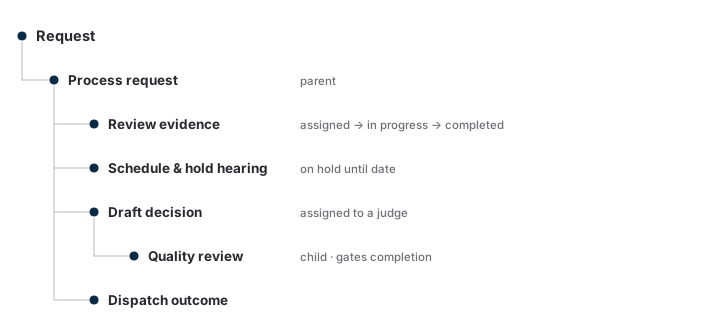
Every actionable thing on a case is a task — review this evidence, hold a session, draft this outcome, run a quality review, send the result. A task carries:
- an assignee — a person or a team (a task assigned to a team is open to anyone on it);
- a state — assigned → in progress → completed, with on hold and cancelled off-path;
- a parent — tasks form a tree, so a high-level task (“process this case”) has children that complete before it does.
A case’s status is the state of its task tree — one source of truth for “where is this,” materialized and queryable in the Record. Modeling work as a tree of typed tasks lets one engine express a simple linear process and a branching one with holds and parallel work alike.
The task tree travels with the case into the Reader: a reviewer reading the file sees the case’s tasks — what’s outstanding and where each piece sits — alongside the evidence, so the work the case owes is visible at the center without leaving the file. “This case” and “the work on it” are one view.
Task types
A task has a type — and the type gives it its actions, its form, and where it routes. The platform ships a library of more than a hundred task types covering the breadth of adjudication work, so a deployment composes its process from a rich starting set rather than an empty engine:
| Category | Representative task types (the library carries more) |
|---|---|
| Correspondence — the mail and filings a case attracts, in and out through the correspondence port | evidence-and-argument, status-inquiry, address-change, representation-change, privacy-act-request, foia-request, withdrawal, returned-mail |
| Motions — pre- and post-decisional motions a case can raise, each created, assigned, and resolved on the tree | vacate-motion, reconsideration-motion, aod-motion (advance on docket), extension-request, clear-and-unmistakable-error, docket-switch |
| Administrative & support actions — off-path work that clears a case to proceed | verify-party, verify-representation, verify-power-of-attorney, gather-missing-records, translation, transcription, special-handling-hold |
| Hearing actions — scheduling, conducting, and the follow-on a session triggers | schedule-hearing, reschedule-hearing, assign-disposition, change-disposition, change-request-type, no-show-followup, transcribe-recording |
| Review & decision — assignment through routing the outcome | assign-to-reviewer, draft-outcome, rewrite-outcome, quality-review, judge-decision-review, dispatch-return, route-outcome |
| Distribution, holds & notifications — the engine work that moves cases between people | distribution-run, timed-hold, evidence-window, notification-letter, final-notification, court-remand-letter, post-decision-hold |
Each type is configuration: a deployment uses the library as-is, adapts a type, or defines its own, and composes them into the workflows a case type runs. The library is the depth; Admin is where it’s shaped. The breadth is what makes the engine commercial — a new operation does not write a representation-change task type from scratch; it picks the one already configured, points its routing rule at the team that owns it, and ships the workflow.
Queues
A queue is a saved, ordered query over tasks — “assigned to me,” “my team’s, waiting over 30 days,” “in quality review.” The same task appears in every queue whose filter it matches; moving work is reassignment, and the queues re-derive. A user opens a queue, sees each item’s status, searches and filters within it, sets how many to show per page, and sees the document and page counts of each case’s file at a glance. Opening a case marks it read for that user, who can set it back to unread. Managing a case and managing a queue are two views of the same records.
The worklist a reviewer picks from is one of these queues — the Docket surfacing the next case onto the reviewer’s landing surface and into the Reader. Picking a case off the worklist and opening it is the moment the loop hands the case to the center: the reviewer reads its evidence and decides its issues there, and the Docket waits on the resulting task to complete.
Distribution & priority
Work reaches people two ways: a privileged user pulls a set of cases into a queue, or the engine distributes them automatically. Automatic distribution runs on a set of tunable levers — how many cases go to a person or team at once (the batch size), how long a case waits before it’s eligible, how cases are balanced across the lanes they’re organized into, and how priority is handled. A privileged user adjusts the levers, can test a change against current work before applying it, and every change is recorded like any other action — so the distribution policy is governed configuration, not buried code.
Priority and age order the rest. Priority cases (advanced-on-docket, court-remanded, and whatever else a deployment defines) are distributed ahead of the queue; within a lane, cases are taken in age order. Different case types carry different workflows, and a case can switch type — or move between lanes — to pick up a new one.
Every distribution run is its own audited record — when it started and completed, the assignee, the batch size, the case ids it selected, and its status (pending / started / completed / error). A failed run persists with the reason so it can be retried instead of silently lost.
Deadlines and escalation
A task can carry a timer — an expiration plus an escalation kind (cancel, reassign-supervisor, reopen, flag). A sweep, run on schedule or on demand, surfaces every timer whose deadline has passed while its task is still open and applies the configured escalation. Each escalation is a one-shot — the timer is consumed and the action is recorded — so a deployment can see what aged out and what it did about it. Timers turn “stale on hold” from an invisible failure into a visible, audited handoff.
Working a case
On a case a user views and edits its details, adds notes, and assigns and works its tasks — several people on one task, reassignment of an open task (assigned, in progress, or on hold), bulk assignment, and cancellation. Multiple users work the same case at once. Pre- and post-decisional motions are created, assigned, and resolved as tasks — each with its own disposition (granted, denied, dismissed), and a granted post-decision motion can reshape the case, reopening a decided issue; parties are substituted when representation changes; and configurable visual indicators (a contested matter, say) flag a case at a glance, added or removed by privileged users. Each case shows a summary of its key attributes and the document and page counts of its file, and a party’s full set of cases is one view.
Follow-on work
Cases generate more cases. A case splits into two (same identifier, different issues on each) or two merge into one; post-decision a case is withdrawn, dismissed, or reactivated; and a new request related to a decided one is taken in and processed. Often the trigger is an issue’s disposition — a remand opening new work, a grant closing it — so follow-on is a rule over an outcome, not a manual step. Each is the engine creating or reshaping tasks on the same machinery — the next task, on the same tree — re-entering the loop where it began.
Quality review
Quality review is a task that gates its parent’s completion, assigned to a reviewer rather than the original worker — so a case completes once its review does, with the policy carried by the workflow shape. Reviews are selected automatically by rule or by hand; the errors found and the corrective actions taken are documented on the review; and a review can be edited, withdrawn, or checked for status. The same task carries work-product evaluation — scoring an author’s output along defined factors — surfaced later through reporting.
Routing the outcome
This is the seam from the Docket’s side: what the Reader produces — the case’s decided issues, each carrying its disposition and citing the evidence pages that prove it — is exactly what the engine carries onward. When that work is composed into a signed outcome, whose outline is the issue list, the Docket routes it onward — a review-for-accuracy task, then handoff to the delivery and effectuation ports that assemble the package and send it out. Routing is a rule over the task’s state, so a deployment decides what a completed outcome triggers. The last mile — print, mail, propagation into another system of record — is integrate-or-provide; the decision to route lives here. With the outcome dispatched, the engine turns back to the worklist and surfaces the reviewer’s next case — closing the loop.
Configuration is the product
The engine is fixed and general — tasks, states, the tree, queues, distribution. The task types, workflows, and rules are configuration a deployment manages: a privileged user composes a process from task types, creates queues, and writes the rules that drive assignment, holds, priority, and routing. Changing a process is a configuration change, not a release — which is what makes the work engine one commercial product rather than one hardcoded process.